Leadpath
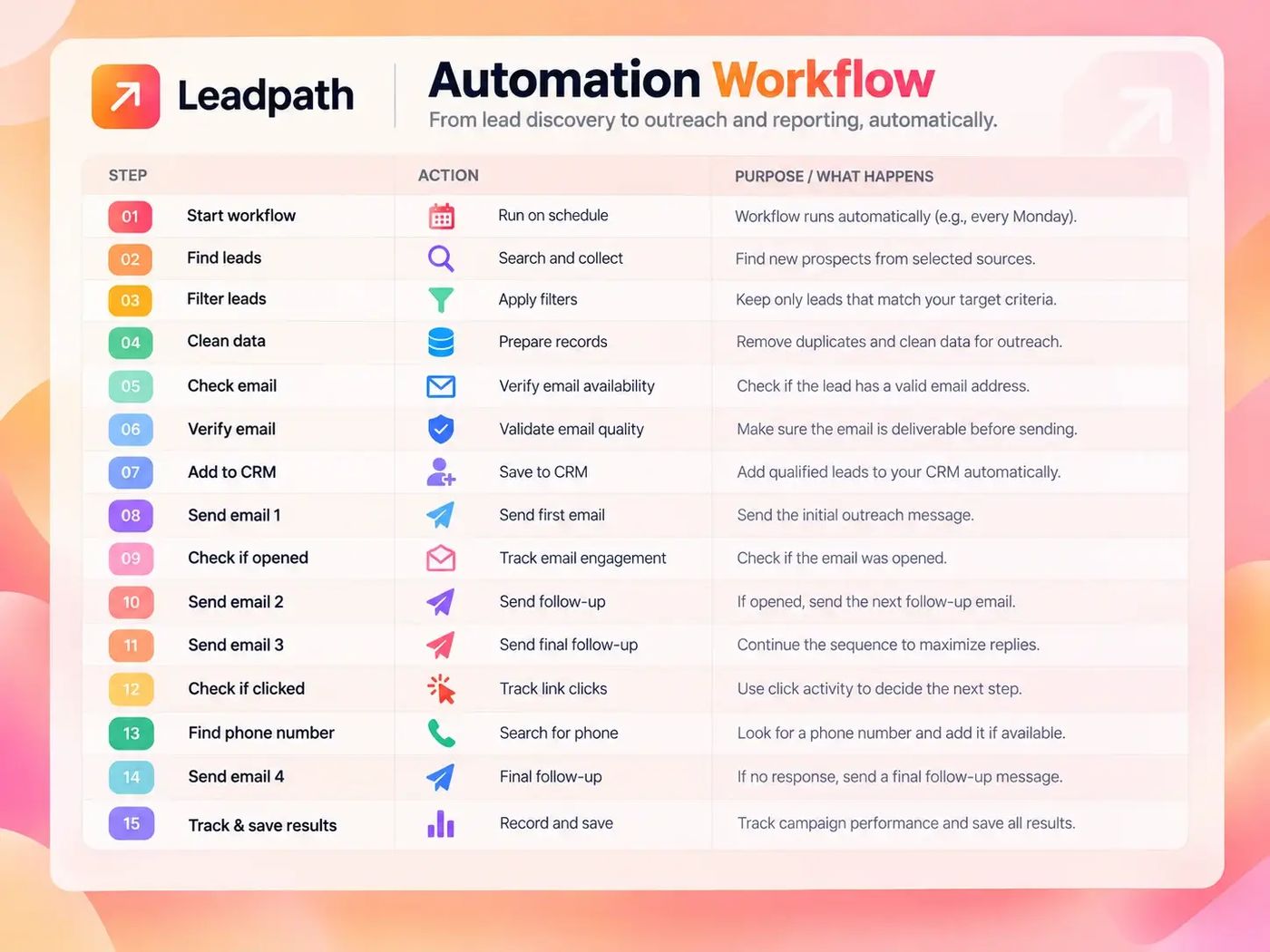
We built Leadpath so a real estate team does not spend Monday morning pasting leads into a sheet. It finds new records, cleans them, and sends four follow-up emails on its own.
Leadpath ↗- Customer: A real estate team that follows up on new leads.
- Problem: Monday morning goes to pasting leads into a sheet.
- Solution: Leadpath finds new records, cleans them, and sends four follow-up emails.
- Outcome: The notes run for 14 days, then stop. The path can be email or a phone.
- Strategic win: The week starts with the follow-up already sent.
Monday morning was a pile of new leads, and nobody to clean them.
Real estate leads show up every week. The messy part is duplicates, a missing email, and a follow-up that someone forgets on Thursday.
Why it was hard
Finding a name is the easy part. The mess is what happens after: the same person listed twice, a missing email, and a follow-up someone forgets on Thursday. We put that whole week into one set of steps that runs by itself.
- New for-sale-by-owner, rental, and owner records show up every week. For sale by owner means the owner is selling, with no agent. Last week's list is already old
- A lead with no email is not a dead lead. It just should not enter the same campaign
- Four emails is enough. A fifth one, sent because nobody looked, is how you land in spam
- Opens and replies only help if the email tool actually reports them
What you get
- ✓Starts every Monday. Nobody has to open it
- ✓Pulls new for-sale-by-owner, rental, owner, or other records from the places we set up
- ✓Drops the same person listed twice, and lines up the boxes, before anyone is emailed
- ✓Email on the record: we check it, save the lead, and start the campaign
- ✓No email: we look up a phone number and save that lead on a separate list
- ✓Keeps delivery, opens, replies, and the leads themselves for the next Monday
Every Monday
We set the workflow to wake up on its own. It looks for leads that were not in last week's list: for-sale-by-owner homes, rentals, owners, or another source that client asked for.
Open Leadpath →Clean, then split
We drop the same person listed twice, and rows that are not a fit, and we make the boxes match. Then one question: is there an email? Yes goes to a check, then the team's contact list and the emails. No goes to a phone lookup and a backup list.
Email checking →Four notes, then stop
Day 1 is a short introduction. Day 3 is the first follow-up. Day 7 is the second. Day 14 is the last one. If the email tool can see that someone opened or replied, the steps can skip or stop. If it cannot, those four still go out on the days we set.
See how steps run themselves →Four emails, then it stops
It runs every Monday. Nobody uploads a file.
New leads come in, the list gets cleaned, and only people with a checked email get the four notes. Everyone else is saved with a phone number when we can find one. The results stay with the lead, so the next Monday is not a fresh pile of the same names.
The days and the yes-or-no split are the steps we designed. Which tool checks the email, which contact list it lands in, and whether a reply actually stops the emails depends on what is connected for that client.
Open Leadpath ↗