On this page
Introduction
Data is the new oil in real estate. Investors, agents, and proptech startups are using automated data pipelines to gain competitive advantages—from instant property valuations to predictive market analysis.
This guide shows you how to build production-ready real estate data solutions using Apify, RapidAPI, Python, and n8n. We'll cover real code examples, sample outputs, and a proven case study.
What You'll Build
- Automated Zillow & Realtor.com data extraction
- Property valuation estimate pipelines
- Lead enrichment workflows with n8n
- Client-facing property reports for profit
Tools & Platforms Overview
Here's your toolkit for building real estate data solutions:
Apify
Cloud-based scraping platform with pre-built actors for Zillow, Realtor, Redfin.
- Zillow Scraper Actor
- Realtor.com Scraper
- Scheduled runs & webhooks
RapidAPI
Marketplace of APIs including official and unofficial real estate endpoints.
- Zillow API (unofficial)
- Realtor API
- Property Estimate APIs
Python
Custom scripts for data processing, API calls, and automation.
- requests + BeautifulSoup
- pandas for data processing
- Schedule for cron jobs
n8n
Self-hosted workflow automation. Connect APIs, databases, and notifications.
- HTTP Request nodes
- Google Sheets integration
- Email/Slack notifications
Extracting Zillow Property Data
Zillow is the #1 source for property estimates (Zestimates), listing history, and comparable sales.
Method 1: Apify Zillow Scraper
# Using Apify Python Client
from apify_client import ApifyClient

client = ApifyClient("YOUR_APIFY_TOKEN")

run_input = {
    "searchType": "address",
    "search": "123 Main St, Los Angeles, CA",
    "maxItems": 1
}

run = client.actor("maxcopell/zillow-scraper").call(run_input=run_input)

for item in client.dataset(run["defaultDatasetId"]).iterate_items():
    print(f"Address: {item['address']}")
    print(f"Zestimate: {item['zestimate']}")
    print(f"Beds: {item['bedrooms']}, Baths: {item['bathrooms']}")
    print(f"Sqft: {item['livingArea']}")
Sample Output:
Address: 123 Main St, Los Angeles, CA 90012
Zestimate: $1,245,000
Beds: 4, Baths: 3
Sqft: 2,450
Last Sold: $980,000 (2019)
Price Change: +27%
Realtor.com API Integration
RapidAPI hosts several Realtor.com scrapers that provide MLS-like data without official API access.
RapidAPI Realtor Endpoint
import requests

url = "https://realtor16.p.rapidapi.com/search"
headers = {
    "X-RapidAPI-Key": "YOUR_RAPIDAPI_KEY",
    "X-RapidAPI-Host": "realtor16.p.rapidapi.com"
}
params = {
    "location": "Dallas, TX",
    "status": "for_sale",
    "limit": "20"
}

response = requests.get(url, headers=headers, params=params)
data = response.json()

for prop in data['properties']:
    print(f"{prop['address']['line']} - {prop['list_price']}")
    print(f"  Agent: {prop['agent']['name']}")
    print(f"  Phone: {prop['agent']['phone']}")
Data You Get:
Full Python Automation Script
Here's a complete script that fetches property data, enriches it, and saves to CSV:
import requests
import pandas as pd
from datetime import datetime

# Configuration
API_KEY = "your_rapidapi_key"
LOCATIONS = ["Austin, TX", "Denver, CO", "Phoenix, AZ"]

def fetch_listings(location):
    url = "https://realtor16.p.rapidapi.com/search"
    headers = {"X-RapidAPI-Key": API_KEY, "X-RapidAPI-Host": "realtor16.p.rapidapi.com"}
    params = {"location": location, "status": "for_sale", "limit": "50"}

    response = requests.get(url, headers=headers, params=params)
    return response.json().get('properties', [])

def process_data(properties, location):
    records = []
    for p in properties:
        records.append({
            "location": location,
            "address": p.get('address', {}).get('line', ''),
            "city": p.get('address', {}).get('city', ''),
            "price": p.get('list_price', 0),
            "beds": p.get('description', {}).get('beds', 0),
            "baths": p.get('description', {}).get('baths', 0),
            "sqft": p.get('description', {}).get('sqft', 0),
            "price_per_sqft": round(p.get('list_price', 0) / max(p.get('description', {}).get('sqft', 1), 1), 2),
            "agent_name": p.get('primary_agent', {}).get('name', ''),
            "agent_phone": p.get('primary_agent', {}).get('phone', ''),
            "scraped_at": datetime.now().isoformat()
        })
    return records

# Main Execution
all_records = []
for loc in LOCATIONS:
    print(f"Fetching {loc}...")
    listings = fetch_listings(loc)
    all_records.extend(process_data(listings, loc))

df = pd.DataFrame(all_records)
df.to_csv(f"real_estate_data_{datetime.now().strftime('%Y%m%d')}.csv", index=False)
print(f"Saved {len(df)} properties to CSV")
n8n Workflow: Automated Pipeline
n8n lets you build visual workflows that run on a schedule without writing code.
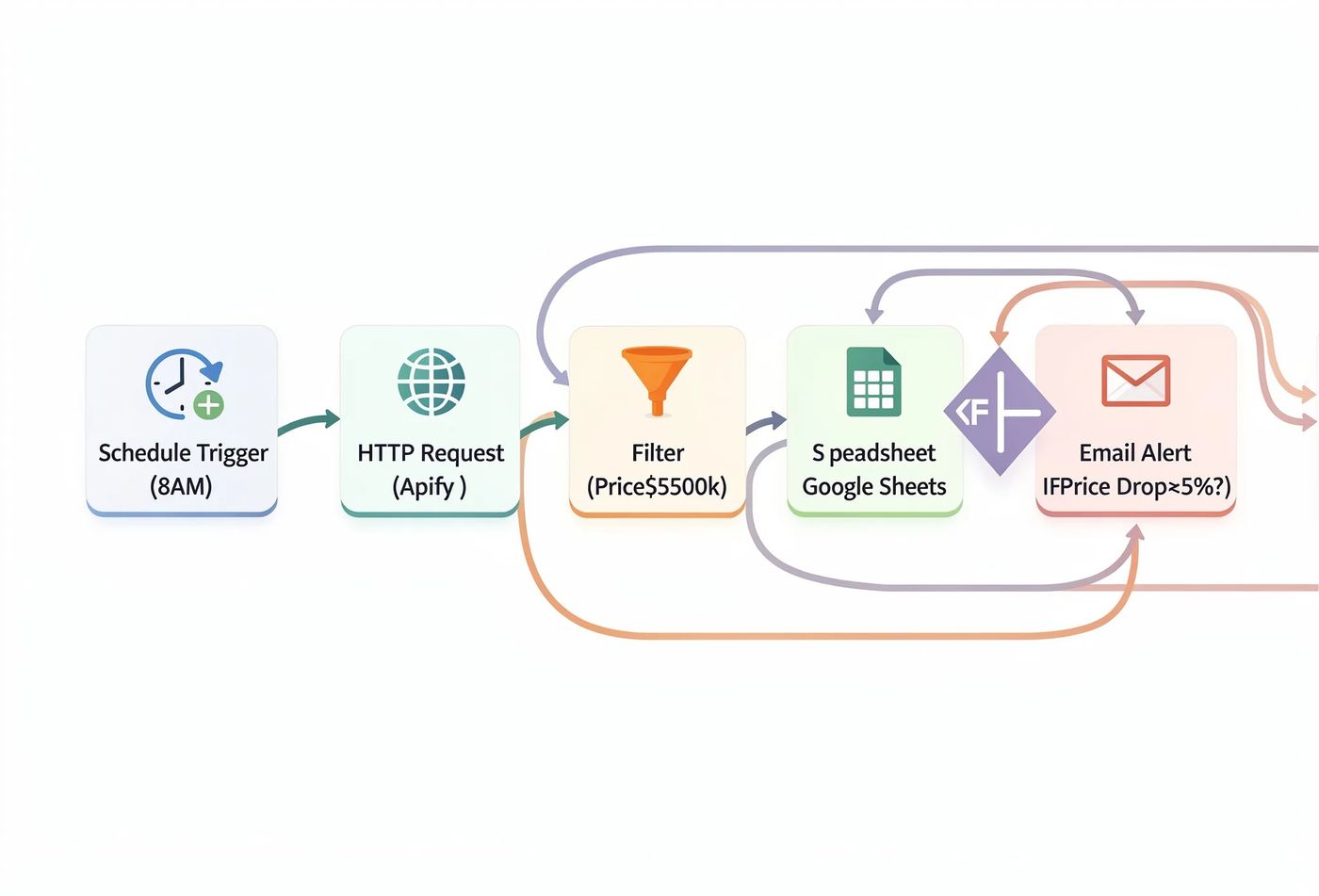
Example n8n Workflow: Zillow → Enrich → Google Sheets → Email
Workflow Steps:
- Schedule Trigger: Run daily at 8:00 AM
- HTTP Request: Call Apify Zillow Scraper API
- Filter: Keep only properties under $500k
- Google Sheets: Append new listings to spreadsheet
- IF Condition: Check if price dropped >5%
- Email: Send "Price Drop Alert" to client
Automated Property Valuation Estimates
Offer instant property valuations to clients by combining multiple data sources.
Estimate Formula
def calculate_estimate(property_data):
    # Get comparable sales (last 6 months, within 0.5 miles)
    comps = get_comparable_sales(property_data['address'])

    # Average price per sqft from comps
    avg_price_per_sqft = sum(c['sold_price'] / c['sqft'] for c in comps) / len(comps)

    # Base estimate
    base_estimate = avg_price_per_sqft * property_data['sqft']

    # Adjustments
    adjustments = 0
    if property_data['renovated_year'] > 2020:
        adjustments += base_estimate * 0.05  # +5% for recent reno
    if property_data['pool']:
        adjustments += 25000  # +$25k for pool
    if property_data['garage_spaces'] > 2:
        adjustments += 10000  # +$10k for extra garage

    final_estimate = base_estimate + adjustments

    return {
        "low": round(final_estimate * 0.95),
        "mid": round(final_estimate),
        "high": round(final_estimate * 1.05),
        "comps_used": len(comps)
    }
Sample Estimate Output:
Property: 456 Oak Avenue, Austin, TX
Sqft: 2,100 | Beds: 3 | Baths: 2

Estimated Value Range:
  Low:  $485,000
  Mid:  $510,000
  High: $535,000

Based on 8 comparable sales within 0.5 miles
Case Study: PropertyPro Analytics
Client Success Story
The Challenge:
A real estate investment firm was spending 20+ hours/week manually researching properties across 5 markets. They needed faster due diligence.
The Solution:
We built an automated pipeline using Apify + n8n + Airtable that scraped new listings daily, calculated instant estimates, and flagged undervalued properties.
85%
Time Saved
2,500+
Properties/Week
$340K
Deals Closed (3 mo)
"This system paid for itself in the first week. We're now seeing deals before our competitors even know they exist."
— Marcus Chen, Principal Investor
Monetization: Turn Data into Profit
Here's how to package your real estate data solutions and charge clients:
Data Subscription
Sell monthly access to scraped property data for specific markets.
$500-$2,000/mo
Estimate Reports
Charge per property valuation report with comps analysis.
$50-$200/report
Custom Automation
Build bespoke n8n/Python pipelines for investor clients.
$3,000-$10,000
Pro Tip: Start with a free "Sample Report" to demonstrate value. Offer 5 free property estimates, then upsell to a monthly subscription or custom dashboard.
Frequently asked questions
Are these APIs legal to use?
RapidAPI hosts third-party APIs—always check each API's terms. For scraping, use ethical rates and respect robots.txt. Apify actors typically handle compliance. Never redistribute raw data commercially without permission.
How accurate are automated property estimates?
Typically within 5-10% of actual sale price when using 5+ comps. Accuracy improves with more data points (renovations, condition, local factors). Always include a disclaimer.
What's the cost to run these automations?
Entry level: ~$50/month (Apify free tier + RapidAPI basic). Production scale: $200-$500/month for higher limits. n8n is free if self-hosted.


 MD Kawsar· September 26, 2026 · 10 min read