On this page
Introduction
In the fast-paced world of software development, manual testing simply cannot keep up with the speed of delivery. Web automation involves using software to programmatically control a web browser to perform repetitive tasks, form filling, navigation, and data extraction automatically.
Did you know?
According to recent surveys, nearly 77% of testers are involved in web automation testing. It is no longer a luxury but a necessity for modern CI/CD pipelines.
How Web Automation Works
At its core, web automation relies on a framework (like Selenium or Playwright) that communicates with a browser driver to execute commands on the actual browser.
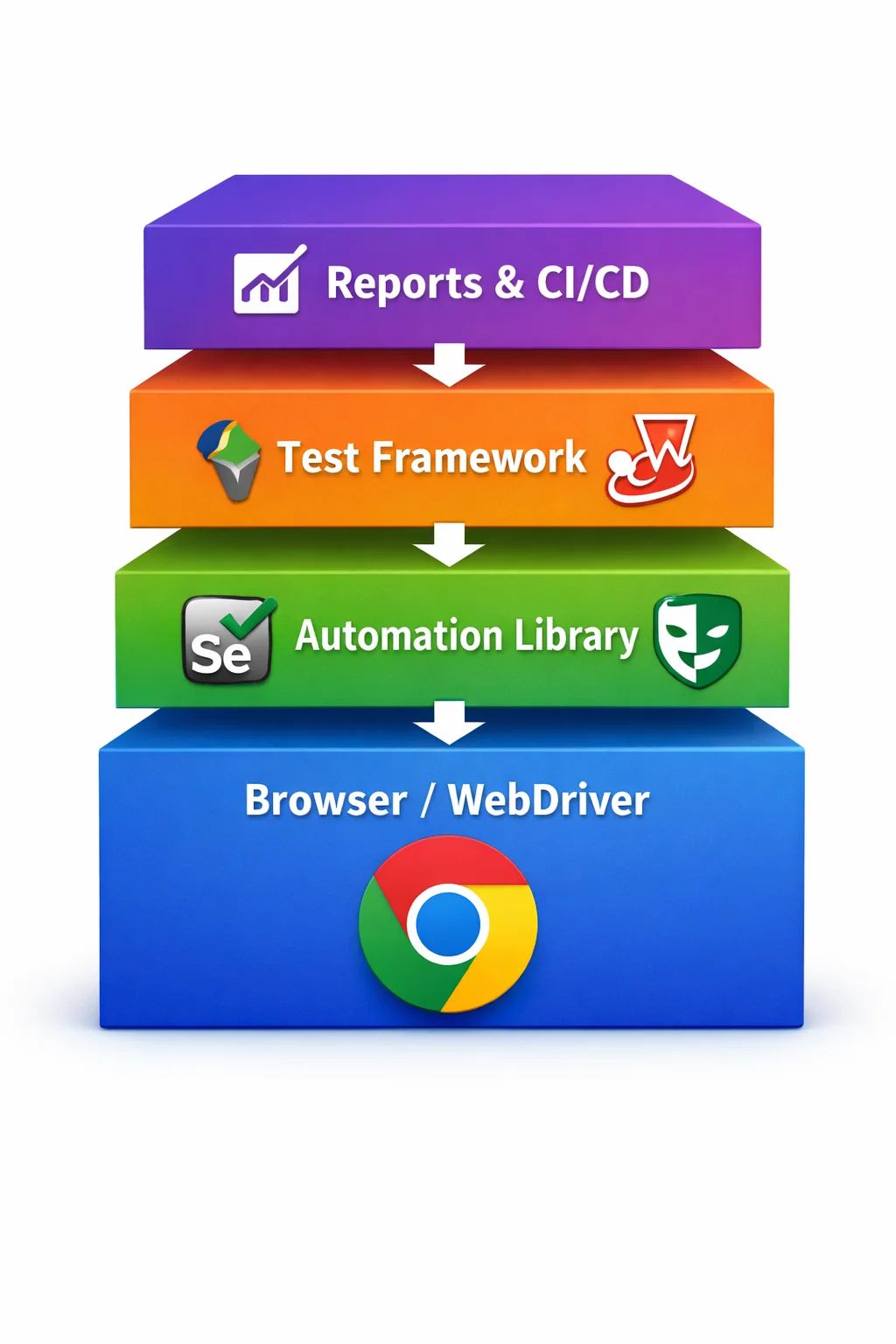
Figure: The operational stack of a modern web automation framework
Manual vs Automated Testing
While manual testing is essential for usability and exploratory scenarios, automation excels at repetitive regression testing.
Manual Testing
- Slow Execution Humans can only click so fast.
- Prone to Fatigue Repetitive tasks lead to human error.
- Great for UX Humans can judge "look and feel".
Automated Testing
- Lightning Fast Execute thousands of tests in minutes.
- 100% Accurate Scripts do exactly what they are told.
- Reusable Write once, run forever on every commit.
Detailed Implementation Guide
1. Define the Scope
Don't try to automate everything at once. Start with your Smoke Test Suite (critical paths like Login, Checkout, Signup).
2. Choose Your Weapon
The Industry Standard. Supports all languages & browsers.
Modern, fast, and handles dynamic content natively.
Developer-friendly, runs directly in the browser.
3. Write Your First Test (Playwright)
import { test, expect } from '@playwright/test';

test('has title and login works', async ({ page }) => {
  // 1. Go to the page
  await page.goto('https://example.com/login');

  // 2. Fill inputs
  await page.fill('#username', 'testuser');
  await page.fill('#password', 'secret123');

  // 3. Click button
  await page.click('button[type="submit"]');

  // 4. Assert success
  await expect(page).toHaveURL(/.*dashboard/);
  await expect(page.locator('.welcome-msg')).toContainText('Hello, testuser');
});
Best Practices for 2025
Data-Driven Testing
Never hardcode data. Keep test data in external JSON/CSV files so you can run the same test with different inputs.
Atomic Tests
Keep tests independent. One test failing should never stop another test from running.
Use Page Object Model
Separate page structure (selectors) from test logic to make maintenance easy when UI changes.
Handle Dynamic Waits
Never use hard sleeps like thread.sleep(5000). Use smart waits like waitForSelector.
Frequently asked questions
What is the best tool for beginners?
Playwright is currently highly recommended for beginners due to its auto-waiting mechanism, great documentation, and strict defaults that reduce "flaky" tests.
How is Web Automation different from AI?
Traditional Web Automation follows strict, pre-defined steps (click here, type this). AI Automation (using tools like ChatGPT) can adapt to changes, "see" the screen, and heal broken selectors automatically.
Can I automate Captchas?
Generally, no. Captchas are designed to stop bots. In testing environments, it is best to disable Captchas or use a special "testing bypass key".


 MD Kawsar· September 26, 2026 · 10 min read