On this page
Introduction
Do you log into the same portal every morning, click the same three buttons, download a CSV, and email it? Stop doing that.
In this guide, we're not just scraping data; we're interacting with the web. We'll build a robust script using Playwright (Python) to automate a full user workflow: Login, Dashboard Navigation, and File Download.
Why Playwright over Selenium?
Selenium has been around forever, but for modern web automation, Microsoft's Playwright is the new king.
Auto-Waiting: No more time.sleep(5). Playwright waits for elements to be actionable automatically.
Speed: It communicates directly with the browser engine, making it significantly faster.
Headless Mode: Runs invisible in the background by default.
Browser Contexts: Run multiple isolated sessions (like Incognito windows) instantly.
The Scenario: "The Daily Report"
The Mission
- Open the company portal login page.
- Enter username/password and click Login.
- Wait for the Dashboard to load.
- Navigate to the "Reports" section.
- Click "Download Daily CSV" and save it to a specific folder.
Step 1: Setup & Login
First, install Playwright: pip install playwright and playwright install.
from playwright.sync_api import sync_playwright

with sync_playwright() as p:
    # Launch browser (set headless=False to see it working)
    browser = p.chromium.launch(headless=False)
    page = browser.new_page()

    # 1. Go to Login Page
    page.goto("https://portal.example.com/login")

    # 2. Fill Credentials
    page.fill("input#username", "my_email@company.com")
    page.fill("input#password", "super_secret_password")

    # 3. Click Login
    page.click("button[type='submit']")

    # Wait for URL to change (confirmation of login)
    page.wait_for_url("**/dashboard")
    print("Login Successful!")

    browser.close()
Step 2: Navigation & Interactions
Playwright is smart. If the menu takes 2 seconds to slide out, Playwright waits.
Navigating Menus
# Click the 'Reports' sidebar link
page.click("a#nav-reports")

# Wait for the reports table to appear
page.wait_for_selector("table.reports-list")
Step 3: Handling Downloads
Downloads can be tricky because they open native system dialogs. Playwright handles this gracefully with the expect_download context manager.
The Download Handler
# Start waiting for the download BEFORE clicking
with page.expect_download() as download_info:
    page.click("button#download-csv")

download = download_info.value

# Save it specifically where we want
download.save_as("C:/Reports/daily_report.csv")

print(f"Downloaded: {download.suggested_filename}")
Going Headless (Background Mode)
Once your script works, change headless=True. Now the script runs invisibly!
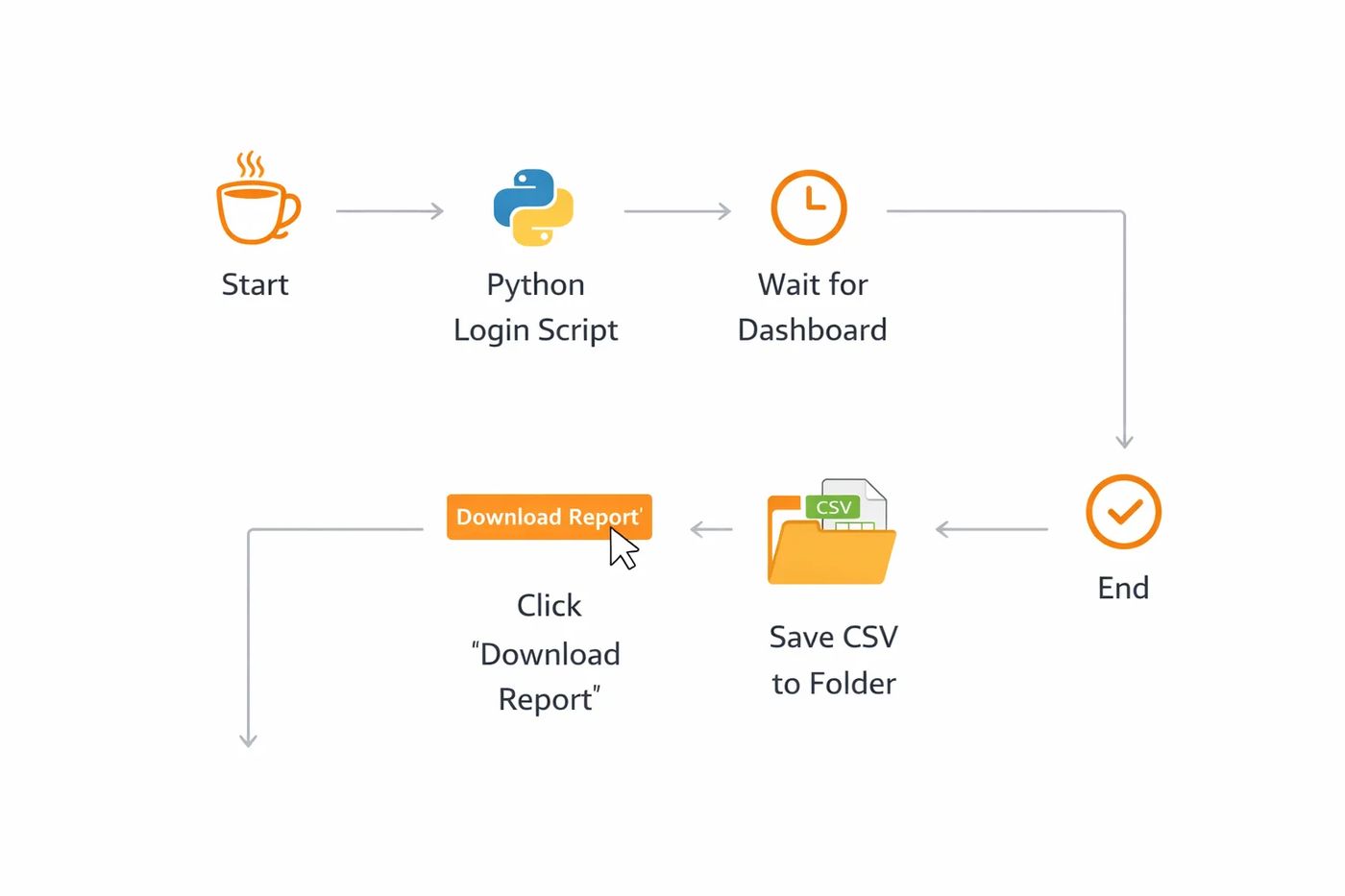
Visualizing the Login to Download Workflow
Key Takeaway
You can schedule this python script using Windows Task Scheduler or Cron (Linux) to run every morning at 8:00 AM. Your report will be ready before you even sip your coffee.
Frequently asked questions
Does this work on sites with 2FA?
It's harder. You would need to automate the OTP retrieval (from email API or authenticator secret) or save the 'browser state' (cookies) after logging in once manually.
Will I get banned?
If you run it once a day like a human, no. If you run it 10,000 times an hour, yes. Always respect rate limits.
Can I use this for specialized web apps?
Yes! Playwright works with any modern web app, including React, Angular, Vue, and Salesforce.

 MD Kawsar· January 18, 2026 · 12 min read