
On this page
Introduction
Beautiful Soup is a Python library designed for quick turnaround projects like screen-scraping. It provides Pythonic idioms for iterating, searching, and modifying the parse tree of HTML/XML documents.
It sits on top of popular Python parsers like lxml and html.parser, allowing you to try different parsing strategies and trade off speed for flexibility.
Why BeautifulSoup?
- Simple, Pythonic API for navigating HTML/XML
- Automatically handles malformed markup
- Integrates easily with
requests - Large community and extensive documentation
1. Installation
Install Library
pip install beautifulsoup4 lxml requests
We also install lxml (a fast parser) and requests (for fetching web pages).
Basic Import
from bs4 import BeautifulSoup
import requests

# Fetch a page
response = requests.get("https://example.com")
soup = BeautifulSoup(response.text, 'lxml')

print(soup.title.string)
2. Making the Soup
You can parse HTML from a string, a file, or a URL response. Here's the classic "Three Sisters" example from the official docs:
html_doc = """
<html><head><title>The Dormouse's story</title></head>
<body>
<p class="title"><b>The Dormouse's story</b></p>
<p class="story">Once upon a time there were three little sisters; and their names were
<a href="http://example.com/elsie" class="sister" id="link1">Elsie</a>,
<a href="http://example.com/lacie" class="sister" id="link2">Lacie</a> and
<a href="http://example.com/tillie" class="sister" id="link3">Tillie</a>;
and they lived at the bottom of a well.</p>
</body></html>
"""

soup = BeautifulSoup(html_doc, 'html.parser')
print(soup.prettify()) # Nicely formatted output
3. Navigating the Parse Tree
One of BeautifulSoup's superpowers is easy tree traversal.
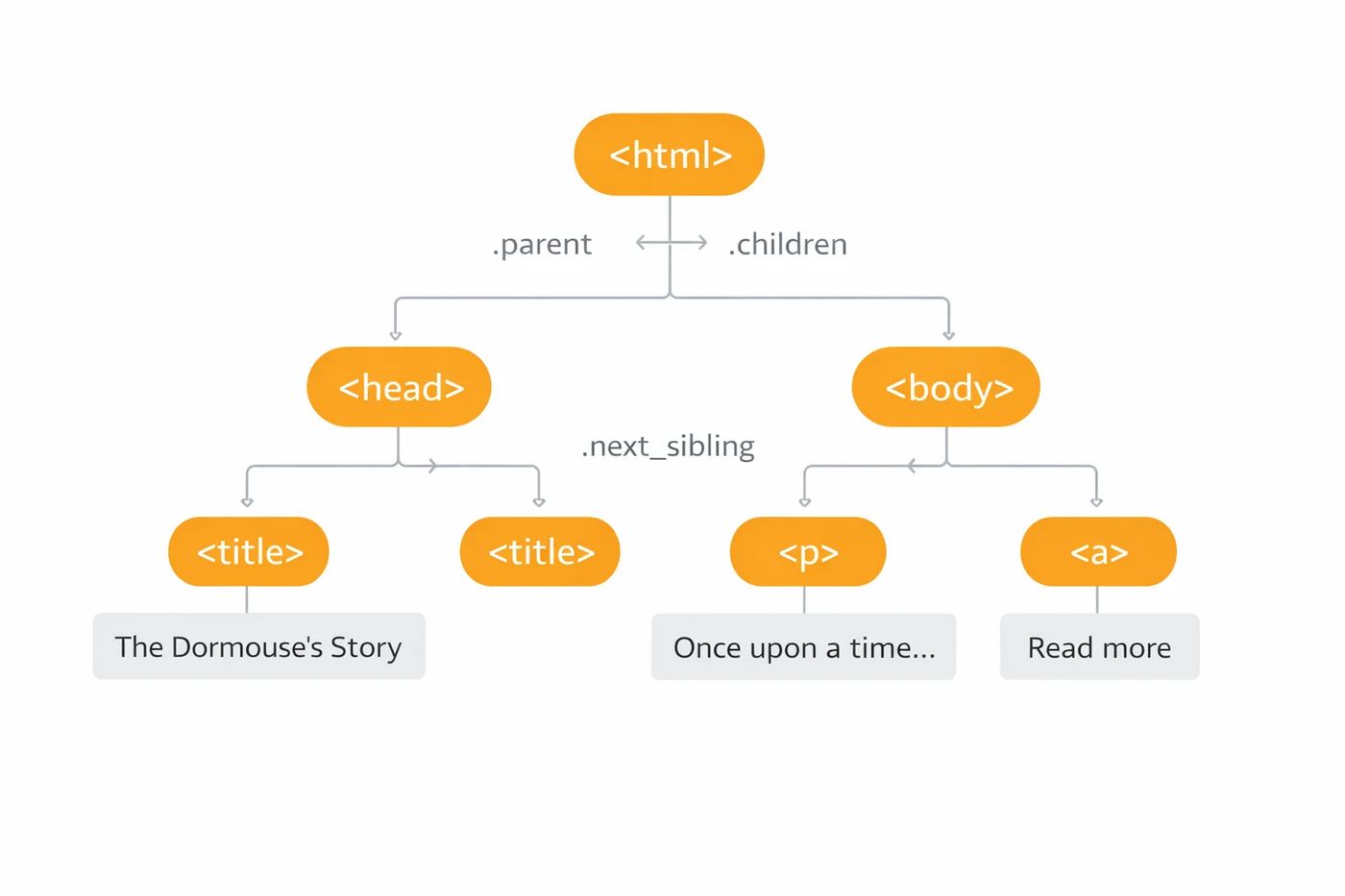
Visualizing the HTML Document as a Tree
# Access tags directly
soup.title          # <title>The Dormouse's story</title>
soup.title.string   # "The Dormouse's story"
soup.title.parent.name  # 'head'

# Get first <p> and first <a>
soup.p              # <p class="title">...</p>
soup.a              # First <a> tag

# Children and Descendants
soup.body.children       # Direct children (iterator)
soup.body.descendants    # All nested elements (iterator)

# Siblings
soup.a.next_sibling      # Next element at same level
soup.a.previous_sibling  # Previous element

# Parent
soup.a.parent            # The <p> containing the <a>
4. The Power of find() and find_all()
These are your workhorse methods for web scraping. find() returns the first match; find_all() returns a list of all matches.
By Tag Name
# Find all <a> tags
soup.find_all('a')

# Find all <p> and <a> tags
soup.find_all(['p', 'a'])
By Attribute
# By ID
soup.find(id="link3")

# By Class
soup.find_all(class_="sister")

# By href
soup.find_all(href=True)
Combined Filters & Regex
import re

# Find <a> with class "sister"
soup.find_all('a', class_='sister')

# Find tags with id starting with "link"
soup.find_all(id=re.compile("^link"))

# Limit results
soup.find_all('a', limit=2)
5. CSS Selectors with .select()
If you know CSS, you'll love .select(). It uses the SoupSieve library to support almost all CSS4 selectors.
# By tag
soup.select("title")

# By class
soup.select(".sister")

# By ID
soup.select("#link1")

# Descendant combinator (any level)
soup.select("body a")          # All <a> inside <body>

# Child combinator (direct child)
soup.select("p > a")           # <a> directly inside <p>

# Attribute selectors
soup.select('a[href]')                      # Has href
soup.select('a[href^="http://example"]')   # href starts with
soup.select('a[href$="tillie"]')           # href ends with
soup.select('a[href*=".com/"]')            # href contains

# Pseudo-selectors
soup.select("p:nth-of-type(2)")            # 2nd <p> tag

# Multiple selectors
soup.select("#link1, #link2")

# select_one() for single result
soup.select_one(".sister")
6. Extracting Data
Once you've found your elements, here's how to get the data out.
# Get text content
tag.string          # Text if only one child string
tag.get_text()      # All text, flattened
tag.get_text(separator=" | ", strip=True)

# Get attributes
tag['href']                 # Access like dictionary
tag.get('href')             # Safer, returns None if missing
tag.attrs                   # All attributes as dict

# Example: Extract all links
for link in soup.find_all('a'):
    print(link.get('href'))
    # http://example.com/elsie
    # http://example.com/lacie
    # http://example.com/tillie

# Example: Get all text from page
print(soup.get_text())
7. Modifying the HTML
BeautifulSoup isn't just for reading—you can modify the tree and output new HTML.
# Change tag name
tag.name = "strong"

# Change text
tag.string = "New content"

# Change attribute
tag['class'] = 'new-class'
del tag['id']  # Remove attribute

# Add new tag
new_tag = soup.new_tag("p")
new_tag.string = "A new paragraph"
soup.body.append(new_tag)

# Remove a tag
tag.decompose()  # Destroys tag and contents
tag.extract()    # Removes but returns it

# Replace
tag.replace_with(soup.new_tag("div"))

# Output modified HTML
print(soup.prettify())
Frequently asked questions
What parser should I use?
'lxml' is the fastest and most lenient. 'html.parser' is built-in (no extra install). 'html5lib' is slowest but parses exactly like a browser.
How do I handle encoding issues?
BeautifulSoup uses 'Unicode, Dammit' to auto-detect encoding. If you know the encoding, pass it: BeautifulSoup(html, 'lxml', from_encoding='iso-8859-1').
Can BeautifulSoup run JavaScript?
No. BeautifulSoup only parses static HTML. For JavaScript-rendered content, use Selenium or Playwright first, then pass the rendered HTML to BeautifulSoup.


 MD Kawsar· January 18, 2026 · 11 min read