On this page
What is Data Scraping?
Data scraping (also called web scraping) is the automated extraction of data from websites or applications. Instead of manually copying information, software programs (scrapers) visit web pages and systematically collect specific data points.
How It Works:
- Request: The scraper sends HTTP requests to a website (like a browser would)
- Parse: It receives HTML/JSON and parses the content
- Extract: Specific data points are extracted using selectors (CSS, XPath)
- Store: Data is saved to a database, CSV, or API
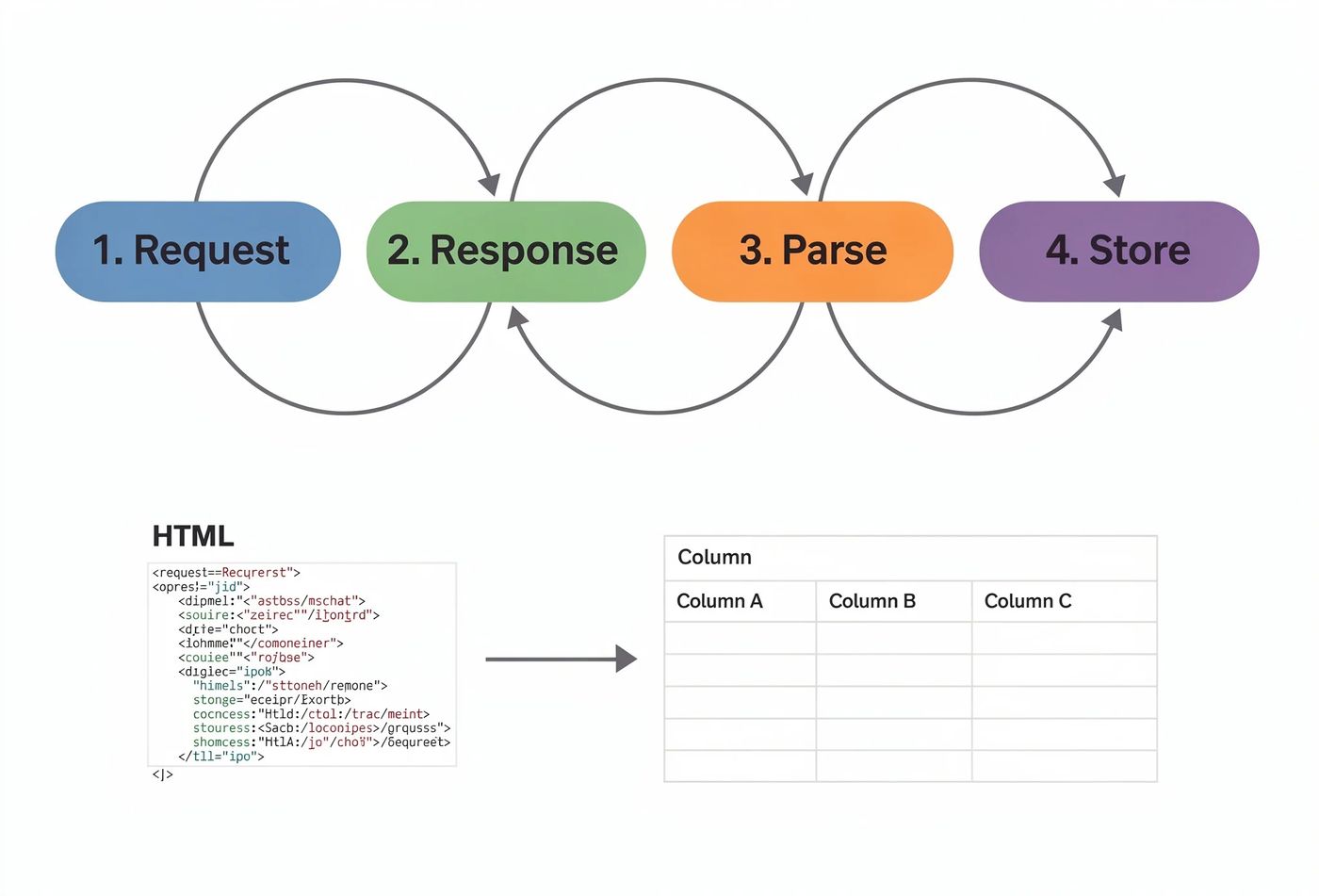
The Web Scraping Process Flow
Why Do People Scrape Data?
Data scraping has many legitimate and valuable use cases across industries:
Legitimate Uses
- Price Monitoring: E-commerce competitors tracking prices
- Market Research: Analyzing industry trends and sentiment
- Academic Research: Collecting data for studies
- Lead Generation: Finding business contacts
- News Aggregation: Compiling headlines from multiple sources
- SEO Analysis: Monitoring search rankings
- Real Estate: Tracking property listings and prices
Malicious Uses
- Content Theft: Copying and republishing articles
- Email Harvesting: Collecting emails for spam
- Credential Stuffing: Testing stolen login credentials
- Competitive Sabotage: Overloading competitor servers
- Personal Data Theft: Collecting PII without consent
- Price Manipulation: Undercutting prices unfairly
The Legal Landscape
The legality of scraping depends on what you scrape, how you scrape, and what you do with the data.
Key Legal Considerations
hiQ Labs v. LinkedIn (2022)
The US 9th Circuit ruled that scraping publicly available data does not violate the CFAA (Computer Fraud and Abuse Act). This was a landmark case for data scraping.
Terms of Service (ToS)
Violating a website's ToS can lead to civil liability, but typically not criminal charges. However, breaching ToS while accessing non-public data can change this.
GDPR & CCPA
Scraping personal data of EU/California residents may violate privacy laws. Even if data is public, processing it may require legal basis.
Copyright
Scraping and republishing copyrighted content (articles, images) without permission is infringement, regardless of the scraping method.
Disclaimer: This is educational content, not legal advice. Always consult a lawyer for your specific situation.
The Rules of Ethical Scraping
Follow these rules to scrape responsibly and avoid legal or ethical issues:
1. Check robots.txt
Always check https://example.com/robots.txt before scraping. This file tells crawlers which paths are allowed or disallowed.
2. Read the Terms of Service
Many sites explicitly prohibit scraping in their ToS. Violating this could expose you to civil lawsuits.
3. Rate Limit Your Requests
Send 1-2 requests per second max. Hammering a server with thousands of requests per minute can be considered a DoS attack.
4. Only Scrape Public Data
Never bypass login pages, CAPTCHAs, or access restrictions. If you need to log in, you're in a gray area.
5. Avoid Personal Data
Scraping names, emails, addresses, or any PII may violate GDPR/CCPA even if it's publicly visible.
6. Identify Your Bot
Use a descriptive User-Agent string that includes your contact info. This builds trust and allows sites to reach you.
Prevention & Detection (For Website Owners)
If you're a website owner wanting to protect your data, here are prevention strategies:
Detection Techniques
- Rate Limiting: Block IPs exceeding a threshold (e.g., 100 requests/minute)
- User-Agent Analysis: Block known bot User-Agents or unusual patterns
- Behavioral Analysis: Real users scroll, pause, and click randomly. Bots don't.
- Honeypot Traps: Hidden links in CSS that only bots follow
- JavaScript Challenges: Require JS execution to render content
- CAPTCHA: Google reCAPTCHA or hCaptcha for suspicious sessions
Signs of Bot Traffic:
Mitigation Strategies
Once you've detected scraping activity, here's how to mitigate it:
Technical Solutions
- Implement Cloudflare Bot Management or AWS WAF
- Use dynamic HTML class names (randomized)
- Serve content via authenticated APIs
- Delay responses for suspicious sessions
- Render content client-side with JavaScript
- Add rate limits per IP/session/account
Legal & Business Solutions
- Clearly state scraping prohibition in ToS
- Send cease-and-desist letters to violators
- Offer official APIs with usage limits
- Watermark or fingerprint your data
- Register copyrights for original content
- Monitor for your data appearing elsewhere
Pro Tip: The best defense is often providing an official API. If users can get data legitimately, they're less likely to scrape.
Best Practices Checklist
Whether you're scraping or protecting against scraping, follow this checklist:
For Scrapers:
- Check robots.txt before scraping
- Rate limit to 1-2 requests/second
- Use a descriptive User-Agent
- Only scrape public, non-login data
- Avoid scraping personal data (PII)
- Don't republish copyrighted content
- Cache responses to reduce requests
- Use official APIs when available
For Website Owners:
- Implement rate limiting and WAF
- Add bot detection (Cloudflare, etc.)
- Use honeypot traps
- Require JavaScript for content render
- Clear anti-scraping terms in ToS
- Offer an official, rate-limited API
- Monitor for data appearing on other sites
- Copyright and watermark valuable content
Frequently asked questions
Is web scraping illegal?
Scraping publicly available data is generally legal (see hiQ v. LinkedIn). However, violating ToS, scraping personal data, bypassing security, or republishing copyrighted content can lead to legal issues. It depends heavily on context.
Can I scrape data and sell it?
Selling scraped data is legally risky. You may violate copyright, database rights (in EU), or privacy laws. Aggregated, anonymized data is safer, but consult a lawyer before commercializing scraped data.
What's the difference between scraping and crawling?
Crawling is discovering and indexing pages (what Google does). Scraping is extracting specific data from those pages. Crawlers navigate; scrapers extract. The terms are often used interchangeably.


 MD Kawsar· January 18, 2026 · 10 min read