On this page
Introduction
Web scraping has evolved dramatically over the past decade. What started as simple HTML parsing with regular expressions has transformed into sophisticated AI-driven data extraction systems capable of understanding context, handling dynamic content, and adapting to website changes automatically.
In this comprehensive guide, we'll explore how artificial intelligence is revolutionizing web scraping, making it more accurate, efficient, and maintainable than ever before.
💡 Key Takeaway
AI-powered web scraping can reduce maintenance costs by up to 80% while improving data accuracy to 99%+.
What is AI-Powered Web Scraping?
AI-powered web scraping uses machine learning models to intelligently extract data from websites without relying on fragile CSS selectors or XPath expressions. Instead, the AI understands the semantic meaning of content.
Core Components
- Natural Language Processing (NLP) - Understands text context and meaning
- Computer Vision - Identifies elements visually, like a human would
- Machine Learning Models - Learn from examples and adapt to changes
- Large Language Models (LLMs) - Extract structured data using prompts
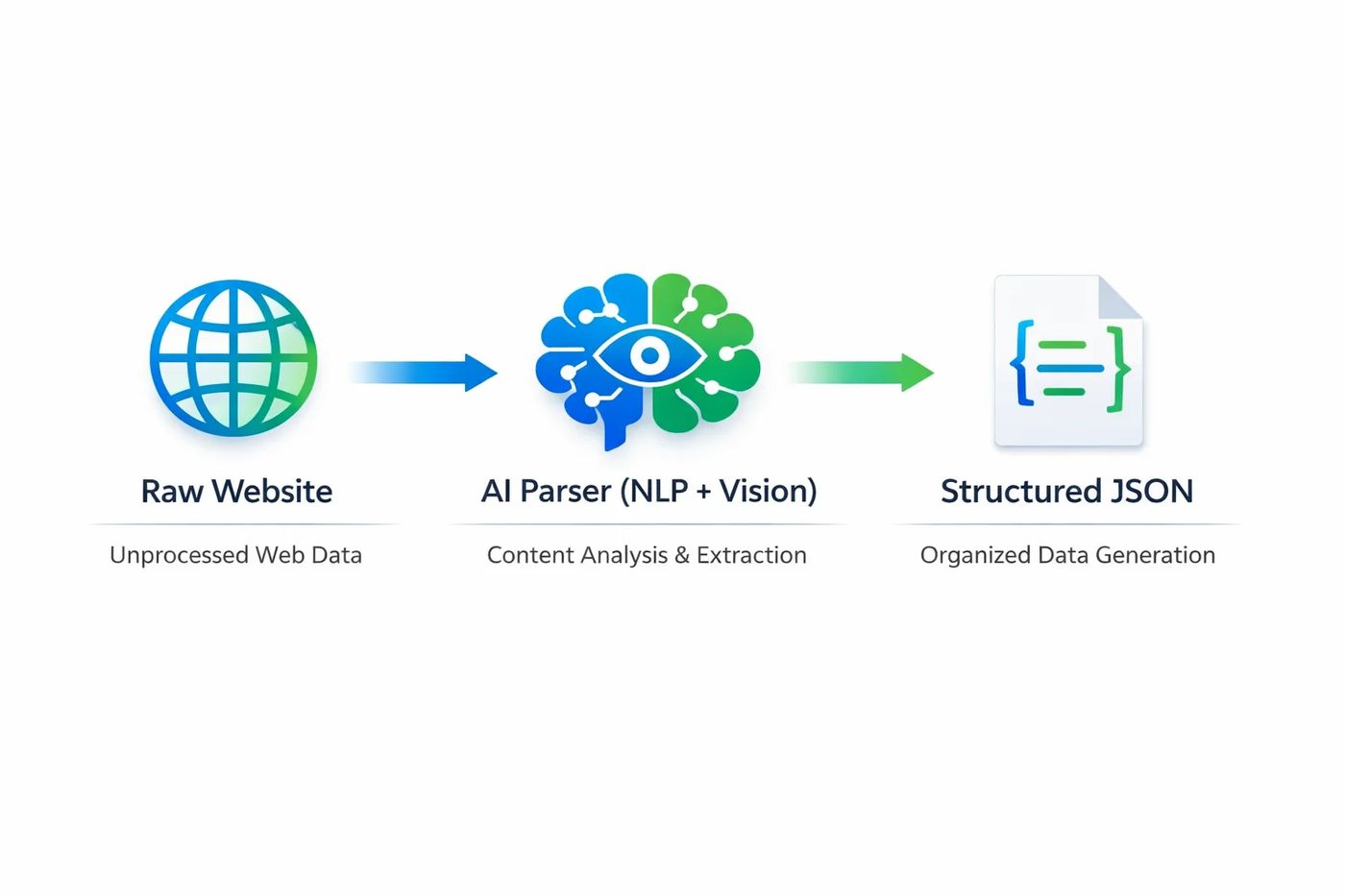
AI Scraping Architecture
Raw Website
HTML, JavaScript, Images
AI Processing
Vision + LLM Analysis
Smart ParsingStructured Data
Clean JSON Output
Traditional Scraping
- Breaks when website layout changes
- Requires complex CSS selectors
- Cannot "see" images or context
AI-Powered Scraping
- Adapts to UI changes automatically
- Understands content like a human
- Reads charts, images, and tables
Traditional vs AI Scraping: A Comparison
Understanding the differences between traditional and AI-powered approaches helps you choose the right tool for your project.
| Feature | Traditional | AI-Powered |
|---|---|---|
| Setup Time | Hours per website | Minutes with training |
| Maintenance | High (breaks often) | Low (self-adapting) |
| Dynamic Content | Requires Selenium | Native support |
| Accuracy | 85-95% | 98-99.5% |
| Cost at Scale | Exponential | Linear |
Key AI Technologies for Web Scraping
1GPT-4 and Large Language Models
LLMs can extract structured data from unstructured HTML by understanding context. You simply describe what data you want, and the model finds it.
import openai

def extract_product_data(html_content):
    response = openai.ChatCompletion.create(
        model="gpt-4",
        messages=[{
            "role": "user",
            "content": f"""Extract product info from this HTML:
            {html_content}

            Return JSON with: name, price, description, rating"""
        }]
    )
return response.choices[0].message.content2Computer Vision for Visual Scraping
When websites use images, canvases, or complex layouts, computer vision models can "see" the page like a human and extract data accordingly.
from openai import OpenAI

client = OpenAI()

def scrape_from_screenshot(image_url):
    response = client.chat.completions.create(
        model="gpt-4-vision-preview",
        messages=[{
            "role": "user",
            "content": [
                {"type": "text", "text": "Extract all product prices from this screenshot"},
                {"type": "image_url", "image_url": {"url": image_url}}
            ]
        }]
    )
    return response.choices[0].message.content
3. Transformer-Based NER Models
Named Entity Recognition (NER) models trained on web data can identify and extract specific entities like prices, dates, addresses, and product names.
Step-by-Step Implementation Guide
Follow this guide to build your own AI-powered web scraper using Python and modern AI APIs.
Step 1: Install Dependencies
pip install openai beautifulsoup4 playwright requestsStep 2: Create the Scraper Class
import openai
from bs4 import BeautifulSoup
import requests

class AIWebScraper:
    def __init__(self, api_key):
        self.client = openai.OpenAI(api_key=api_key)

    def fetch_page(self, url):
        response = requests.get(url, headers={
            'User-Agent': 'Mozilla/5.0 (compatible; AIBot/1.0)'
        })
        return response.text

    def extract_data(self, html, schema):
        """
        Extract data based on a natural language schema.

        schema example: "Extract product name, price, and availability"
        """
        # Clean HTML for better token efficiency
        soup = BeautifulSoup(html, 'html.parser')
        text = soup.get_text(separator=' ', strip=True)[:8000]

        response = self.client.chat.completions.create(
            model="gpt-4-turbo-preview",
            messages=[
                {"role": "system", "content": "You are a data extraction expert."},
                {"role": "user", "content": f"From this text: {text}\n\n{schema}"}
            ],
            response_format={"type": "json_object"}
        )
        return response.choices[0].message.content
Step 3: Use the Scraper
scraper = AIWebScraper(api_key="your-openai-key")

# Scrape product data
html = scraper.fetch_page("https://example.com/product/123")
data = scraper.extract_data(
    html,
    "Extract: product_name, price (as number), currency, in_stock (boolean)"
)
print(data)
# Output: {"product_name": "Widget Pro", "price": 29.99, "currency": "USD", "in_stock": true}
✅ Pro Tip
Always implement rate limiting and respect robots.txt. AI scraping is powerful, but ethical use is essential.
Best Practices for AI Web Scraping
Optimize Token Usage
Clean HTML before sending to LLMs. Remove scripts, styles, and irrelevant content.
Implement Caching
Cache AI responses for identical content to reduce API costs and improve speed.
Handle Errors Gracefully
AI models can occasionally hallucinate. Always validate extracted data against expected schemas.
Monitor & Log
Track extraction accuracy over time. Retrain or refine prompts when quality drops.
Frequently asked questions
Is AI web scraping legal?
AI web scraping follows the same legal considerations as traditional scraping. Always respect robots.txt, terms of service, and data protection laws like GDPR. The AI component doesn't change the legal requirements.
How much does AI-powered scraping cost?
Costs depend on the AI model used. GPT-4 Turbo costs approximately $0.01-0.03 per page, but this is offset by 80% lower maintenance costs and higher accuracy compared to traditional methods.
Can AI scrapers handle JavaScript-rendered content?
Yes! You can combine AI extraction with headless browsers like Playwright or Puppeteer. First render the page, then use AI to extract data from the rendered HTML.
What's the accuracy of AI-powered extraction?
With proper prompting and schema design, AI-powered extraction typically achieves 98-99.5% accuracy, compared to 85-95% for rule-based traditional scrapers.
Do I need to train custom models?
For most use cases, pre-trained LLMs like GPT-4 work out of the box. You only need custom training for highly specialized domains or when you need to process millions of pages cost-effectively.

 MD Kawsar· January 18, 2026 · 11 min read